Run the whole centre from one screen
Attendance, fees, payroll, timetable, syllabus and tests in a single app. Teachers mark in seconds. You see what needs you first — and what it is costing when it slips.
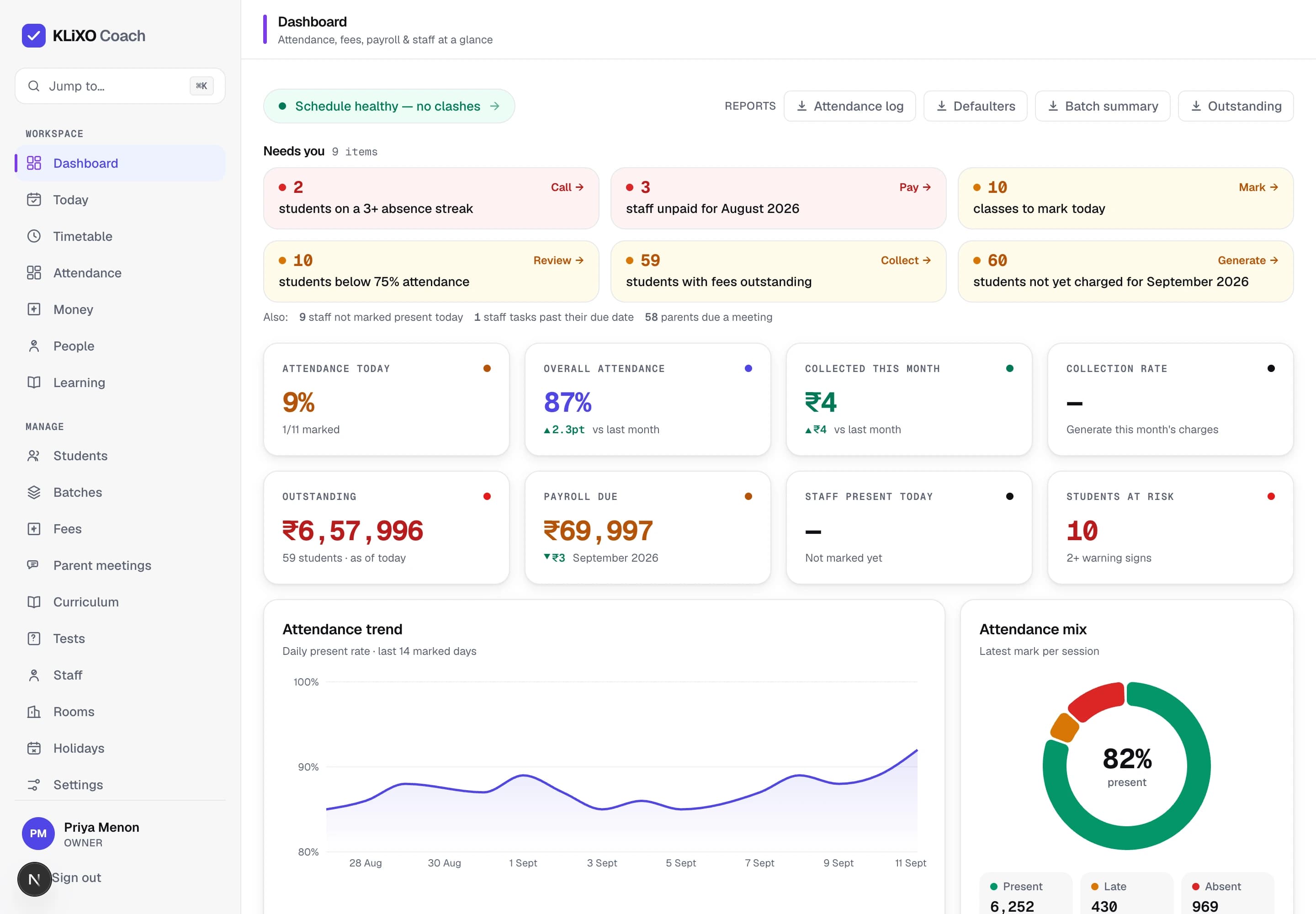
- Attendance
- Fees
- Payroll
- Staff
- Timetable
- Curriculum
- Tests
- Parent meetings
- Student portal
Everyone present by default
Tap only the exceptions. A full batch takes under a minute.
Dues that clear themselves
Charges and payments net off per student, aged by month.
Syllabus against the clock
Chapters tick off and the batch is on track or behind.
Two signals, then a flag
One problem is noise. Two at once is a student to call.
One platform
Run attendance, fees, staff and the day from one login
Four screens, one roster underneath. Switch between them the way an owner does at 9am.
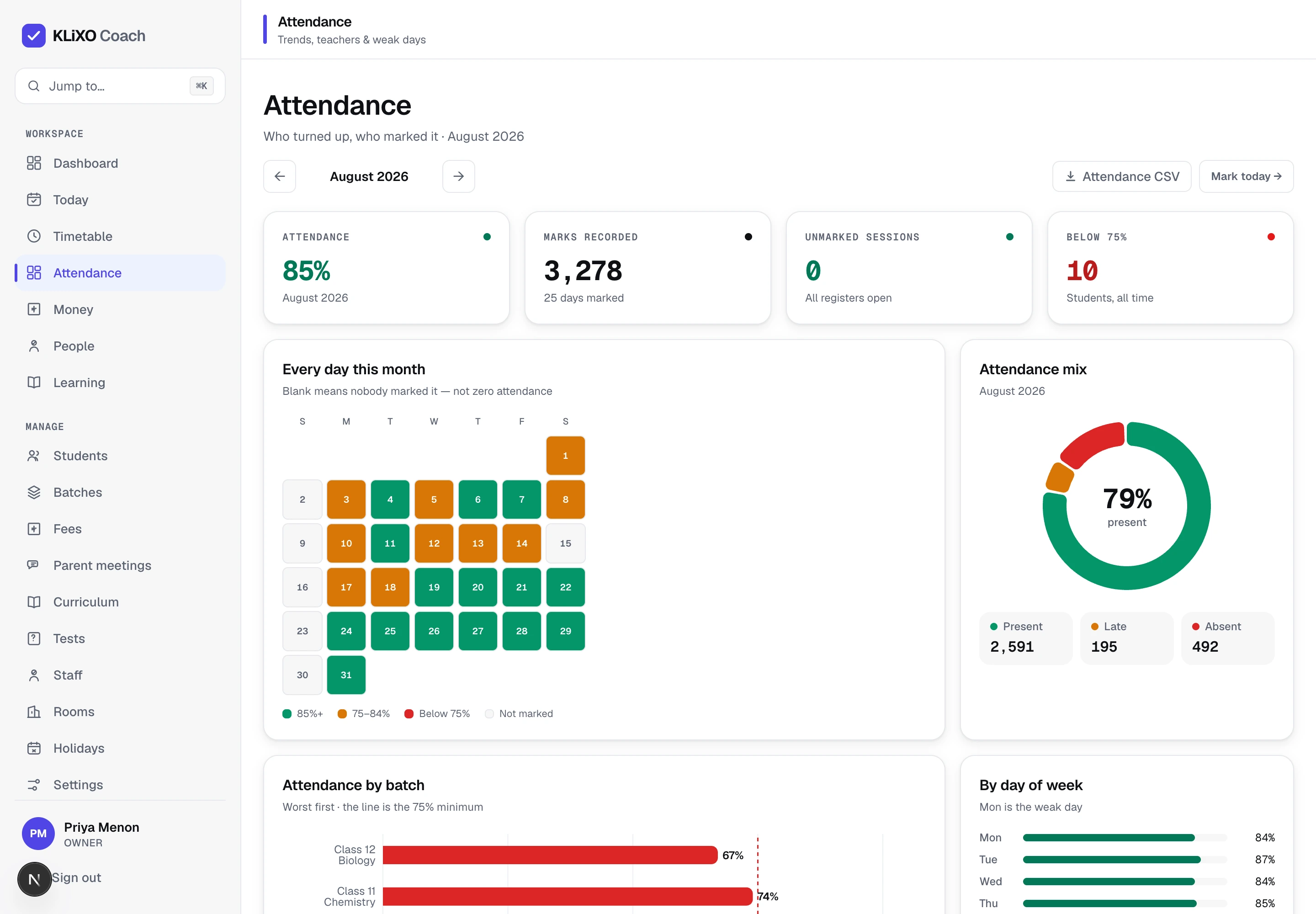
Every session marked, every pattern visible
A heat grid of daily present rate, bars per batch coloured against your threshold, and the teacher table beside them.
- Absence streaks
- Defaulters vs threshold
- Per-batch bars
01Attendance
Mark a full batch before the bell
Everyone defaults to present. The teacher taps the exceptions and submits — under a minute, per session, on a phone. The rest happens on its own.
- Per-session marking with present, late and absent
- Absence streaks surface automatically, with a Call action
- Defaulters measured against your own threshold, not ours
- A calendar heat grid per batch shows the pattern, not just the number
02Fees
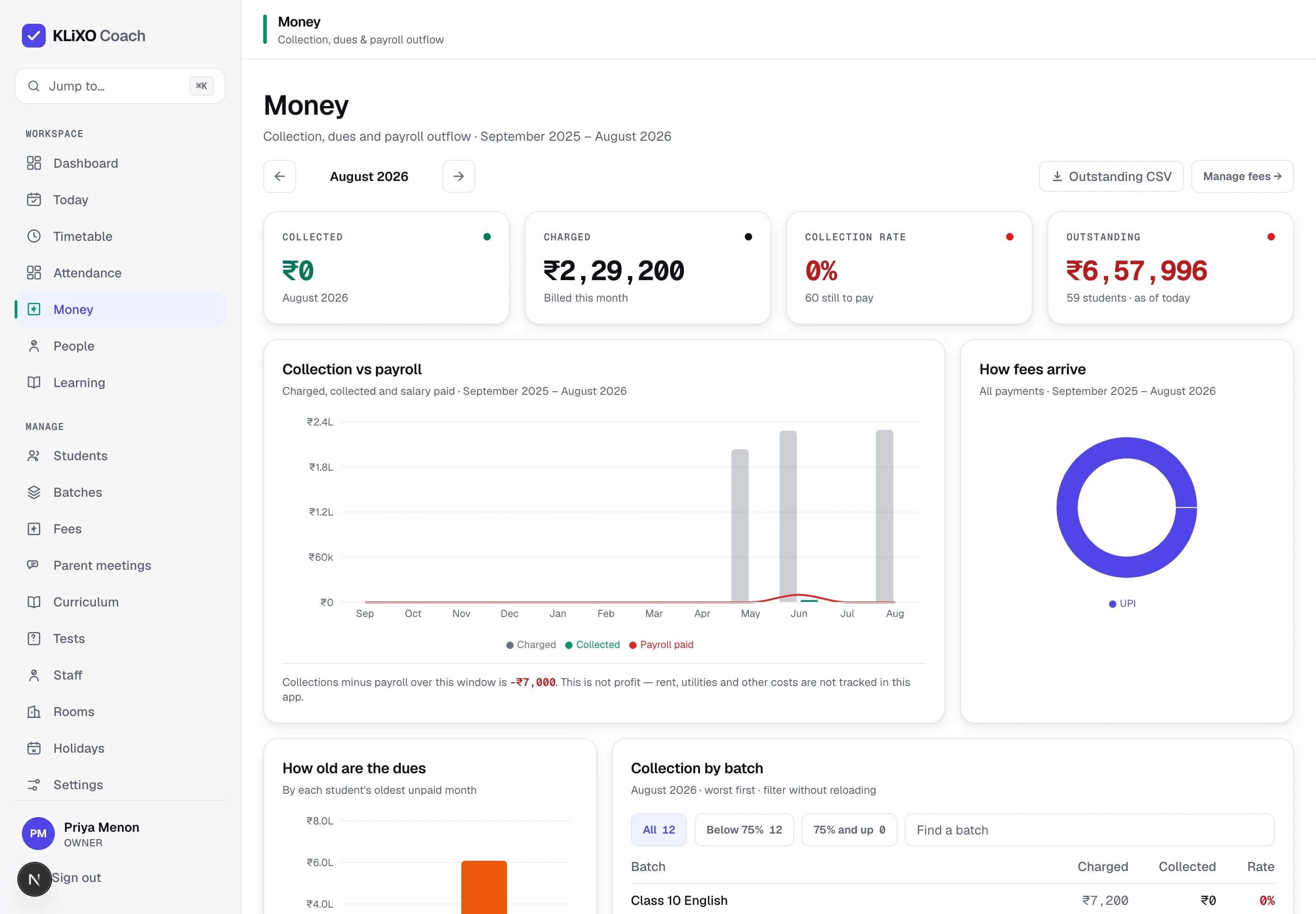
Collect the month's fees without a spreadsheet
What was charged, what came in, what is still owed and how old it is — per batch, per student, per payment. Reminders go out over WhatsApp, so the follow-up is not another job.
- A ledger of charges and payments per student
- Outstanding in ageing buckets, so 90-day dues are not hidden in a total
- Collection rate per batch, against payroll for the same month
- WhatsApp reminders to parents from the defaulters list

0
modules behind one login
0
KPI tiles on the owner dashboard, never more
0+
warning signs before a student is flagged
0
queue of everything that needs you
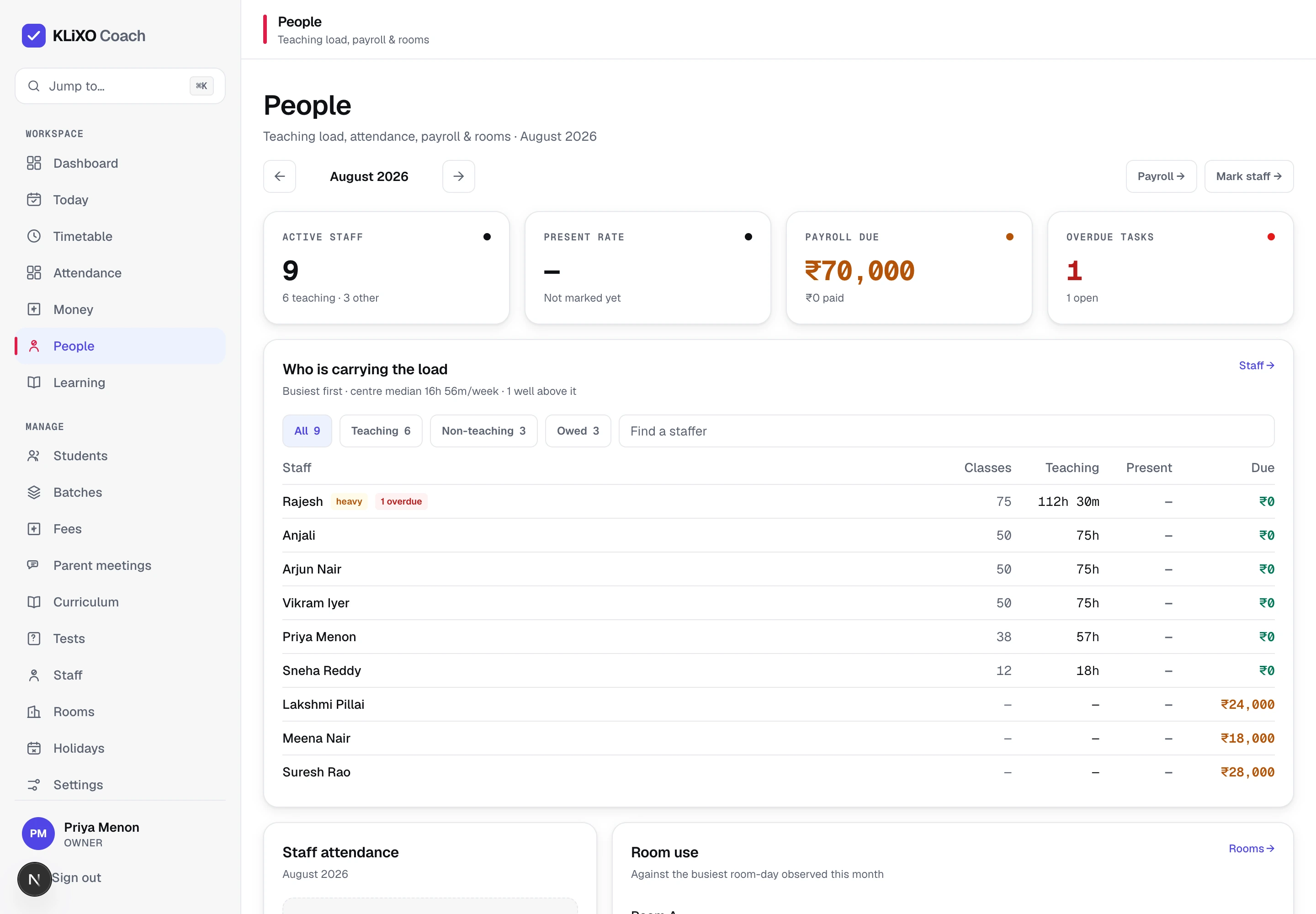
03Staff & payroll
Pay staff correctly every single month
Teaching load is computed from the sessions actually scheduled, not typed in twice. Payroll is base plus adjustments minus what has already been paid — per staffer, per month — and anyone still unpaid shows on the dashboard.
- Teaching load per teacher, straight from the timetable
- Staff attendance and tasks, with overdue tasks flagged
- Base + adjustments − paid, monthly, with the balance visible
- Room utilisation, so an empty Lab 1 at 5pm is not a surprise
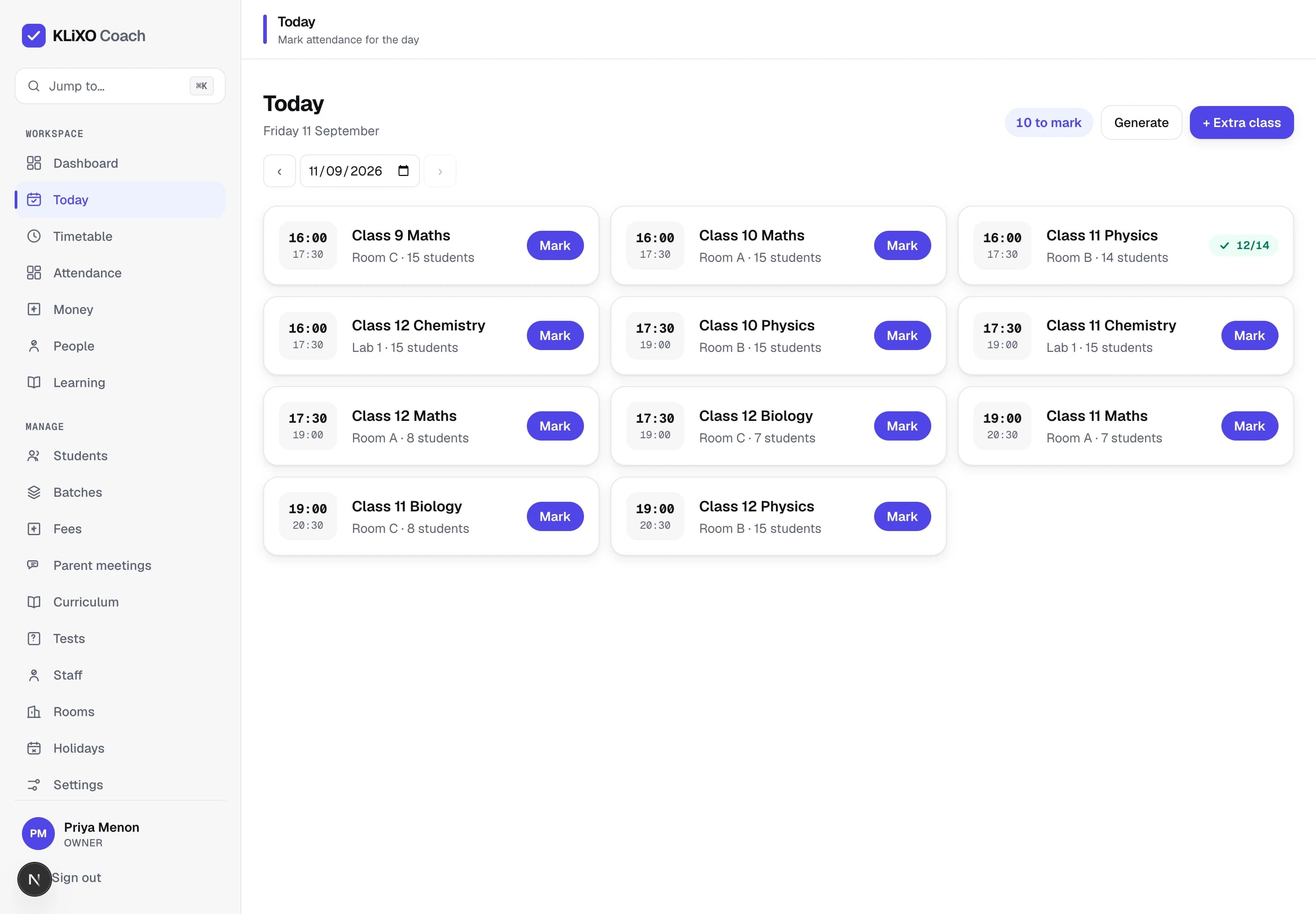
04Timetable
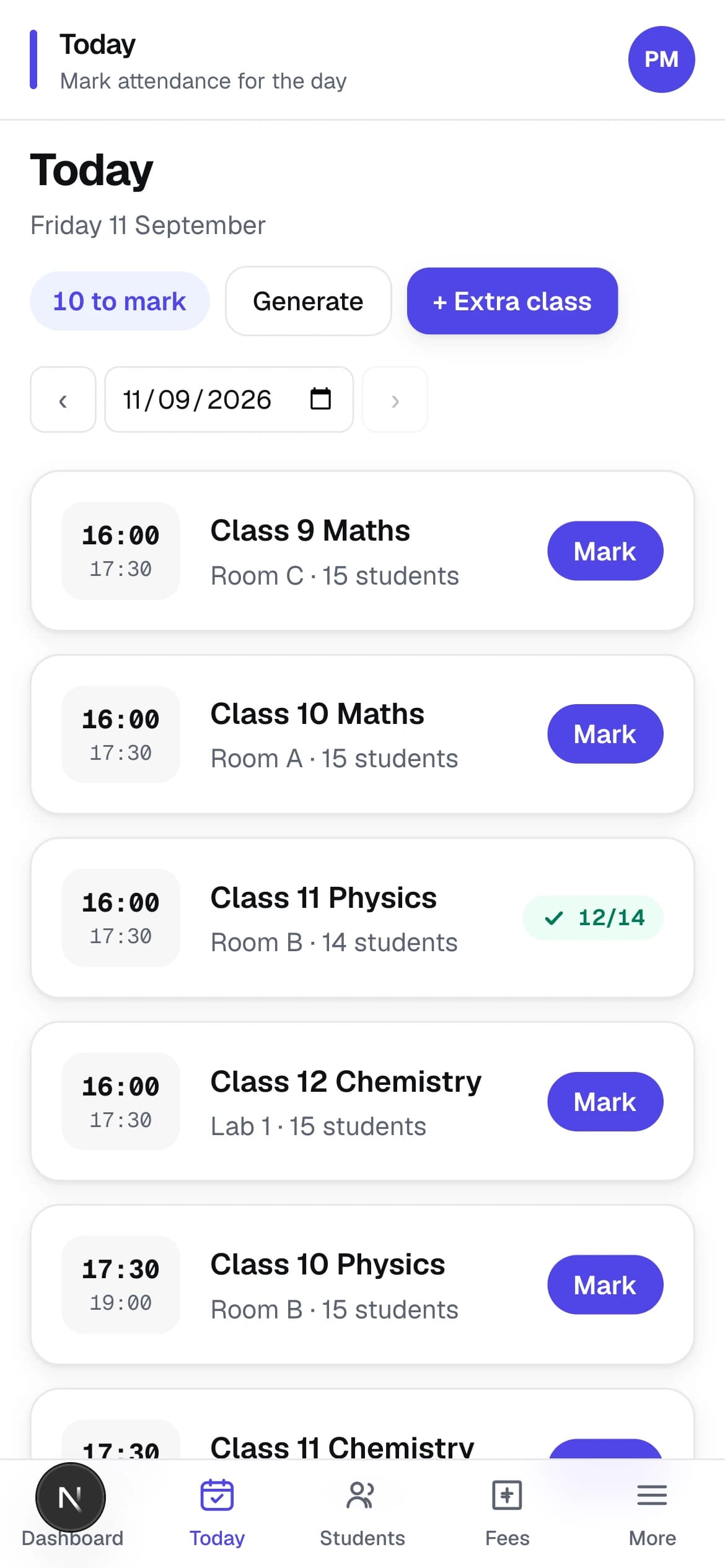
Give every teacher a day that runs itself
Recurring rules generate the sessions. Clashes — a room booked twice, a teacher in two places — are caught when the rule is saved. Each teacher's Today view is just their sessions, in order, with a Mark button on each.
- Recurring rules by batch, teacher, room and slot
- Room and teacher clash detection at save time
- Extra classes and substitutions without breaking the week
- A day view per teacher, on desktop and on the phone
Learning
Keep every batch on syllabus before the board exam
Chapters, tests and parent meetings read the same roster as attendance and fees — so a slipping student is one story, not four.

Curriculum
Track chapters, not hours
Syllabus chapters per batch, ticked off as taught. On-track or behind is computed against the plan, so you know in week six, not at the exam.
Tests
Run MCQ tests and see the pass rate
Build a test, students take it on the portal, the pass percentage lands next to attendance and fees for the same batch.
Parent meetings
Walk into every meeting prepared
Meetings are ranked by risk. Each one carries the attendance, the dues and the latest test, so nobody hunts for a register first.
Student portal
Show parents the same numbers you see
Attendance, fees due and the next class, on their phone. The reminder they got on WhatsApp matches the screen they open.
Before and after
Replace the register, the group chat and the spreadsheet
Today
With KLiXO Coach
A register, a WhatsApp group and an Excel sheet that disagree
One roster, one ledger, one timetable. Every screen reads the same data.
“Who hasn't paid?” is an hour with a spreadsheet
Outstanding by age, per batch and per student, the moment you open Fees.
A parent hears about absences at the next meeting
A 3+ absence streak is flagged the day it happens, with a Call action.
Payroll from memory and a notebook
Base + adjustments − paid, per staffer, per month. Unpaid staff show on the dashboard.
A room clash discovered on Monday morning
Clashes are caught when the recurring rule is saved, not when the class starts.

One roster underneath everything
A student is enrolled once. Attendance, fees, tests and meetings all read that enrolment, so the dashboard is never a week behind the register.
Questions
How it actually works

Do teachers need a laptop?
No. Today and Mark attendance are built phone-first. A teacher opens the day's sessions, everyone defaults to present, they tap the exceptions and submit.
How does a student get marked “at risk”?
Four signals are checked: attendance below your threshold, an absence streak, fees overdue, and a low test score. A student is flagged only when two or more fire at once, and the dashboard shows which ones — never a black-box score.
Can we set our own attendance threshold?
Yes. The defaulter cut-off is configurable per centre. Change it and the defaulters list, the at-risk signal and the per-batch bars all recalculate against it.
How are fees tracked?
As a ledger of charges and payments per student. Outstanding is what was charged minus what came in, bucketed by age, with a collection rate per batch. Reminders go to parents over WhatsApp.
What do parents see?
The student portal shows attendance, fees due and the next class. Parent meetings are ranked by risk so the conversations that matter most happen first.
How is payroll worked out?
Per staffer, per month: base pay plus adjustments minus what has already been paid. Teaching load comes from the sessions actually scheduled, so it is never typed in twice.
Why it is different
See what needs you before it costs you
The dashboard is not a report. Every problem in the centre arrives as a queue item, paired with the one screen that clears it — and a student is flagged only when two separate signals fire, with both reasons shown.
A signal, then the remedy
Unmarked registers, unpaid staff, overdue fees — each with the action that resolves it.
Evidence, never a score
43% attendance · absent ×64 · ₹18,000 due. You see why, so you can disagree.
Every module, one queue
Attendance, fees, payroll and meetings compete for the same attention, in one place.
Your centre already has the data. This puts it to work.
Open the dashboard, read the Needs You queue, fix the first item. That is the whole workflow.